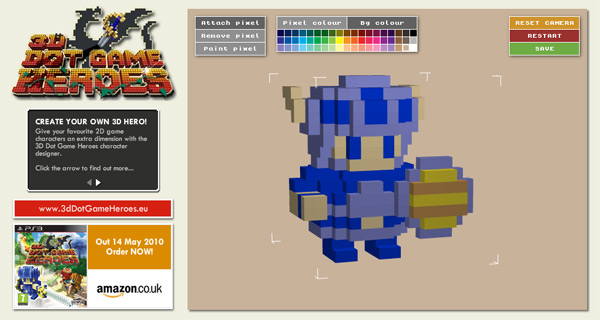
We’ve just launched a cool Flash application that uses Papervision3D to create a simple yet fun 3D modelling environment.
Developed for games publisher SouthPeak Interactive’s upcoming launch of 3D Dot Game Heroes™ on PlayStation®3, the tool has been spectacularly well received by the games’ fans and has led to over 2,000 designs being created and saved in the first 24 hours alone!

So why not plumb the depths of your imagination and create your very own original 3D gaming sprite. Or, if you’re old enough to look back in fondness at the old Atari and NES games of yesteryear, try recreating your favourite 8-bit game character in 3D instead. Go on, try it!
by Tim, in 3D, Flash, Include Digital, Viral, Comments Off
We’ve given Jonathan’s website a digital lick of paint in preparation for his second solo album release. The ex-G4 star’s “Forever” is due to hit the shops on 8th October 2008.
Check out the fruits of our endeavours at www.jonathanansell.com

by Tim, in Design, Flash, Include Digital, Websites, No comments
By default, any custom class instances that are passed to a PHP method via AMFPHP are treated as associative arrays. Correct class mapping is essential if we want our PHP files to treat arguments as instances of a particular class.
You can download the sample files for this tutorial here. An introduction to AMFPHP 1.9 and Flash/AS3 is available here.
So class mapping is the process by which AS3 classes are associated with their server-side equivalents in PHP. It is actually remarkably easy to implement, although online information for AS3 implementations is rather scarce on the ground. All we really need is the flash.net.registerClassAlias class.
First, a description of the contents of the sample zip file. There are three directories:
classes – contains the document class specified in the FLA
deploy – this is the publish directory specified in the publish settings of Application.fla
fla – contains the FLA file with ‘../classes’ added to the classpath
The files are all commented, so take a look through each one to get an idea of what’s going on. The key to successful class mapping is the registration of Flash’s PersonVo class to the “vo.PersonVO” PHP class in the Application constructor.
Here are the steps you should follow to get the sample files up and running:
- Extract the files to a directory on your computer (they don’t need to be on a webserver to run through the Flash IDE, but it will make step 2 easier if they are)
- Modify the $servicesPath and $voPath variables in globals.php (in the root of your AMFPHP installation directory) with the path to the extracted ‘deploy/services/’ directory, ensuring the trailing slash is present
- Open Application.as and make sure the private ‘_gateway’ property is set to the location of the gateway.php file in your AMFPHP installation
- Open Application.fla in Flash and publish!
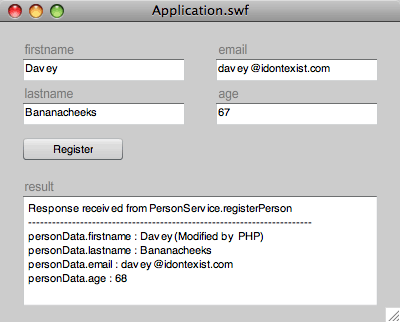
Clicking the ‘Register’ button creates a PersonVO object in Flash which is populated with the contents of the TextInput instances on stage and sends this to the specified service (PersonService.registerPerson). Here’s a screenshot of the sample file once the ‘Register’ button has been clicked:

In a real world situation, the registerPerson() PHP method would process the user data, probably adding the information to a database. In this example, for the sake of simplicity, we demonstrate the fact that the passed $person parameter is of type PersonVO by referencing a property of the class instance – $person->firstname is appended with the string “(Modified by PHP)”. We can also call methods on our PersonVO object, as demonstrated by the call to incrementAge() which adds 1 to the instance’s age property. The instance is then returned by registerPerson(), resulting in the modified PersonVO object being passed back to Flash.
Once a server response is received, the Responder’s onResult() handler displays text in the ‘result’ TextArea. By casting the received object to PersonVO, we can access all the typed properties of the PHP modified object. Notice the ‘firstname’ and ‘age’ properties contain the PHP modified content.
Download source files – class_mapping_demo.zip.
by Tim, in ActionScript, Code, Flash, LAMP, Technology, 1 comment
AMFPHP has been around for a number of years but has only recently captured my interest. It’s not that I’ve had any particular reason to dismiss it, it’s more that I’ve not found any compelling reason use it – I’ve always been an advocate of loading all site data content up-front rather than continually interrupting user flow with frequent data requests, and the majority of Flash websites I’ve worked on require minimal server interaction after the initial load (perhaps some form data submission, maybe some highscore-type database transactions for a game, but that’s about it). All in all, I’ve considered AMFPHP to be unnecessary.
However, the popularity of Flash RIAs has resulted in a more dynamic exchange of information between client and server. Requests are increasingly tailored to the client state, resulting in the need for more frequent, context sensitive communications. This is where AMFPHP comes into its own, both in terms of transaction speed and coding overhead.
For those not familiar with the AMFPHP, it is a data serialisation protocol that allows objects and data types to be sent from Flash to PHP (and vice versa) whilst retaining their data typing. See www.amfphp.org for more information on its design philosophy and an example of the process in action.
The most recent version, AMFPHP 1.9, has been updated to work with AS3 and boasts additional speed increases through compression of the serialised communication. As the product is currently in beta while work continues towards the version 2 release candidate, much of the online documentation is work-in-progress awaiting update, and whilst there is a plethora of Flex based tutorials online (search for ‘amfphp 1.9 flex’) there is relatively little information regarding Flash/AS3 implementations.
This tutorial shows you how to get up and running with AMFPHP and Flash/AS3, and perform some basic server transactions. It’s really pretty straight-forward so let’s get going:
- Download the latest PHP files from SourceForge (http://sourceforge.net/project/showfiles.php?group_id=72483)
- Install the files as described in the online documentation (http://www.amfphp.org/docs2/installing_amfphp.html)
- Now the protocol is installed on your server, you can test the installation. Download the example files and follow the HelloWorld instructions in the documentation (http://www.amfphp.org/docs2/first_service.html).
- Although this is omitted from the online docs, you also need to copy the ‘HelloWorld.php’ file from the sample files ’services’ directory to your AMFPHP services directory (something like http://localhost/amfphp/services/, depending on where you copied the files in step 1).
- Publish the HelloWorld.fla file and pass some serialised text to the server!
So far, so good. AMFPHP is successfully installed and our sample files show that we can pass native data types (a String instance in this case) from Flash to PHP successfully. Passing custom objects (instances of custom classes) is a bit more fiddly, but if you’re interested, you can find out more here.
by Tim, in ActionScript, Code, Flash, LAMP, Technology, No comments
A group of rather talented russian flash developers have been working hard on version 5 of the Alernativa3D engine and have now reached their first milestone.

Check out the magic
Our kettle of cool gives this a rather fabulous 1.6 liters which when converted to cups of tea is 5 out of 5!
by Matthew, in 3D, ActionScript, Flash, Games, Technology, No comments
Swedish – it’s all Greek to me, but this viral piece for Tele2 is outstanding.

by Milan, in Flash, Games, Humour, Viral, Websites, No comments
This dude… he’s such… well… a dude!
The proprietor of the Yes Bar in Berlin has taken narcissism to a new level with this panoramic website, showing his bar filled with identikit punters, all of whom look suspiciously like him. Genius! Give that man a cigar and a vigorous handshake, he rocks my world more than Rocky’s I to VI.


by Milan, in Design, Flash, Websites, No comments
There’s a new Flex tutorial for beginners over at onlamp.com. They rarely cover Flash/Flex (which is fair enough given that it’s a LAMP-based site), but the article is well written and serves as a nice little introduction to the technology.
by Milan, in Code, Flash, Technology, No comments
Poo: love it or hate it, you’re sure to release it now and then. If you’re a big fan of poo you’re sure to enjoy Poo Warrior, the incredibly odd poo-themed Flash game. It’s arguably the best poo game on the ‘net, although Catch a Shit is a strong contender.


Some people have too much love for the brown stuff.
by Milan, in Entertainment, Flash, Games, Viral, No comments