
Archive for the ‘Code’ Category

Developers, get ready for IE 8

27th May

2008

Microsoft is urging developers to tag websites in preparation for the release of IE 8.

According to a post made on an MSDN blog, a public beta of IE 8 will be available in the third quarter of 2008 and it threatens to “render content in its most standards-compliant way by default”. As this is the first time Microsoft has stooped to such murky depths, we are warned that this will play havoc with content written for IE 7. The advice: to implement a specially created meta tag instructing IE 8 to render the content as if it were IE 7.
This is all a lot of fun, I’m sure you’ll agree, and it does seem to offer a pretty straight-forward solution for achieving backwards compatibility. However, given that the two rendering engines are so markedly different, the most excitement will surely be reserved for the future hours spent hacking IE 8 content to display correctly in IE 7. I, for one, can’t wait for that.

AMFPHP 1.9 and AS3 - Class mapping

22nd May

2008

By default, any custom class instances that are passed to a PHP method via AMFPHP are treated as associative arrays. Correct class mapping is essential if we want our PHP files to treat arguments as instances of a particular class.

You can download the sample files for this tutorial here. An introduction to AMFPHP 1.9 and Flash/AS3 is available here.

So class mapping is the process by which AS3 classes are associated with their server-side equivalents in PHP. It is actually remarkably easy to implement, although online information for AS3 implementations is rather scarce on the ground. All we really need is the flash.net.registerClassAlias class.

First, a description of the contents of the sample zip file. There are three directories:

classes - contains the document class specified in the FLA
deploy - this is the publish directory specified in the publish settings of Application.fla
fla - contains the FLA file with ‘../classes’ added to the classpath

The files are all commented, so take a look through each one to get an idea of what’s going on. The key to successful class mapping is the registration of Flash’s PersonVo class to the “vo.PersonVO” PHP class in the Application constructor.

Here are the steps you should follow to get the sample files up and running:

  1. Extract the files to a directory on your computer (they don’t need to be on a webserver to run through the Flash IDE, but it will make step 2 easier if they are)
  2. Modify the $servicesPath and $voPath variables in globals.php (in the root of your AMFPHP installation directory) with the path to the extracted ‘deploy/services/’ directory, ensuring the trailing slash is present
  3. Open Application.as and make sure the private ‘_gateway’ property is set to the location of the gateway.php file in your AMFPHP installation
  4. Open Application.fla in Flash and publish!

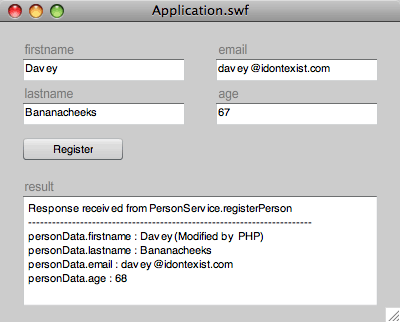
Clicking the ‘Register’ button creates a PersonVO object in Flash which is populated with the contents of the TextInput instances on stage and sends this to the specified service (PersonService.registerPerson). Here’s a screenshot of the sample file once the ‘Register’ button has been clicked:

Class Mapping demo

In a real world situation, the registerPerson() PHP method would process the user data, probably adding the information to a database. In this example, for the sake of simplicity, we demonstrate the fact that the passed $person parameter is of type PersonVO by referencing a property of the class instance - $person->firstname is appended with the string “(Modified by PHP)”. We can also call methods on our PersonVO object, as demonstrated by the call to incrementAge() which adds 1 to the instance’s age property. The instance is then returned by registerPerson(), resulting in the modified PersonVO object being passed back to Flash.

Once a server response is received, the Responder’s onResult() handler displays text in the ‘result’ TextArea. By casting the received object to PersonVO, we can access all the typed properties of the PHP modified object. Notice the ‘firstname’ and ‘age’ properties contain the PHP modified content.

Download source files - class_mapping_demo.zip.

AMFPHP 1.9 and AS3 - An introduction

21st May

2008

AMFPHP has been around for a number of years but has only recently captured my interest. It’s not that I’ve had any particular reason to dismiss it, it’s more that I’ve not found any compelling reason use it - I’ve always been an advocate of loading all site data content up-front rather than continually interrupting user flow with frequent data requests, and the majority of Flash websites I’ve worked on require minimal server interaction after the initial load (perhaps some form data submission, maybe some highscore-type database transactions for a game, but that’s about it). All in all, I’ve considered AMFPHP to be unnecessary.

However, the popularity of Flash RIAs has resulted in a more dynamic exchange of information between client and server. Requests are increasingly tailored to the client state, resulting in the need for more frequent, context sensitive communications. This is where AMFPHP comes into its own, both in terms of transaction speed and coding overhead.

For those not familiar with the AMFPHP, it is a data serialisation protocol that allows objects and data types to be sent from Flash to PHP (and vice versa) whilst retaining their data typing. See www.amfphp.org for more information on its design philosophy and an example of the process in action.

The most recent version, AMFPHP 1.9, has been updated to work with AS3 and boasts additional speed increases through compression of the serialised communication. As the product is currently in beta while work continues towards the version 2 release candidate, much of the online documentation is work-in-progress awaiting update, and whilst there is a plethora of Flex based tutorials online (search for ‘amfphp 1.9 flex’) there is relatively little information regarding Flash/AS3 implementations.

This tutorial shows you how to get up and running with AMFPHP and Flash/AS3, and perform some basic server transactions. It’s really pretty straight-forward so let’s get going:

  1. Download the latest PHP files from SourceForge (http://sourceforge.net/project/showfiles.php?group_id=72483)
  2. Install the files as described in the online documentation (http://www.amfphp.org/docs2/installing_amfphp.html)
  3. Now the protocol is installed on your server, you can test the installation. Download the example files and follow the HelloWorld instructions in the documentation (http://www.amfphp.org/docs2/first_service.html).
  4. Although this is omitted from the online docs, you also need to copy the ‘HelloWorld.php’ file from the sample files ’services’ directory to your AMFPHP services directory (something like http://localhost/amfphp/services/, depending on where you copied the files in step 1).
  5. Publish the HelloWorld.fla file and pass some serialised text to the server!

So far, so good. AMFPHP is successfully installed and our sample files show that we can pass native data types (a String instance in this case) from Flash to PHP successfully. Passing custom objects (instances of custom classes) is a bit more fiddly, but if you’re interested, you can find out more here.

Alternativa3D

18th April

2008

A group of rather talented russian flash developers have been working hard on version 5 of the Alernativa3D engine and have now reached their first milestone.

Check out the magic

Our kettle of cool gives this a rather fabulous 1.6 liters which when converted to cups of tea is 5 out of 5!

We are recruiting (no agencies please!)

4th January

2008

Junior Web Developer - London, UK
Include - http://www.include-digital.com

Include is a digital design agency based in London. Our clients include Universal, EMI and The Sunday Times.

We have an immediate requirement for a Junior Web Developer to join the team in our London office. Previous commercial experience is preferred but not a requirement; enthusiasm and the desire to learn is.

The position would ideally suit an ambitious individual who is looking for an entry point into the industry. The successful candidate will have the opportunity to progress within the agency.

Responsibilities include:

* HTML and CSS authoring, with an awareness of W3C guidelines.
* Updating existing websites and HTML emails.
* On occasion, answering the telephone, making tea, and generally mucking in.

Experience of the following is desirable:

* Designing digital media - primarily websites, HTML emails and online advertising.
* Photoshop, ImageReady or Fireworks.
* Flash/Actionscript.
* PHP/MySQL.

The post requires:

* Good verbal and written communication skills.

The position offers a starting salary of £18,000 plus 20 days’ holiday. The successful candidate will be given ample opportunity to develop skills in-house, with external training provided where required.

To apply:

Please send your CV to jwdjan08@include-digital.com, including any relevant URLs or portfolio material.

For more information on Include, please visit http://www.include-digital.com.

ABSOLUTELY NO AGENCIES! THEY SMELL OF POO AND KIDNAP CHILDREN! FRED WEST WAS A RECRUITMENT AGENT AND HE CAUSED NO END OF BARNEY RUBBLE!

Oracle Annoyances

5th October

2007

I’ve just installed Oracle Database 10g Express Edition to a dev server running Fedora Core, following the detailed instructions supplied by Oracle. The instructions seem very clear: download and install the rpm (oracle-xe-10.2.0.1-1.0.i386.rpm), run a config script, add environment variables to the path. So far, so good.

What the instructions fail to tell you is that the password stipulated during install is completely ignored. So, if you attempt to login to APEX using the username “SYSTEM” and the password you input during install, you’ll be greeted by a cheery “Invalid Login Credentials” message. Cheers Oracle!

To fix this, open a terminal window as user oracle (or any other user with the correct privileges), then login to sqlplus:

sqlplus / as sysdba

Once you’re logged in, change the password for the SYSTEM account:

SQL> ALTER USER SYSTEM IDENTIFIED BY mynewpassord;

If successful, you should see the response:

User altered.

Exit sqlplus and you’re done.

Oracle, if you’re reading this, feel free to fix the installer when it’s convenient…

Introduction to Flex using PHP

20th July

2007

There’s a new Flex tutorial for beginners over at onlamp.com. They rarely cover Flash/Flex (which is fair enough given that it’s a LAMP-based site), but the article is well written and serves as a nice little introduction to the technology.

Adobe to open source Flex framework

26th April

2007

Adobe has today announced its plans to release the Flex source code under the terms of the Mozilla Public License, giving developers the opportunity to contribute to the ongoing development of the framework.

The strategy will mean a closer working relationship between the development team and end user which, in turn, Adobe hopes will attract new developers, improve the framework architecture and lead to opportunities for collaboration with other open source projects.

Adobe will continue to offer a commercial version of the Flex SDK.

More information on the move can be found in the Adobe press release and on the Adobe Labs pages.